Choosing the Right Daily Planner KDP Interior for Your Publishing Success
Entering the world of self-publishing on Amazon Kindle Direct Publishing (KDP) is an exciting venture, but it comes with a steep learning curve. One of the most popular niches for low-content books is the daily planner. However, many new publishers make the critical error of assuming that all interior files are created equal. They download the first Daily Planner KDP Interior they find, upload it without inspection, and wonder why their book receives poor reviews or gets rejected during the review process. The difference between a bestseller and a forgotten listing often lies in the technical quality and usability of the interior design.
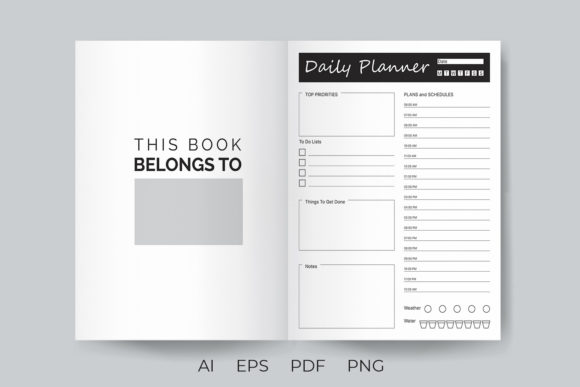
When you are looking for a printable KDP interior book, you are not just buying a PDF; you are investing in the foundation of your product. A high-quality interior should be ready to upload on KDP and also ready to print without requiring extensive redesign work. Understanding what to look for in these files can save you hours of frustration and protect your brand reputation.
The Trap of Non-Editable Formats
A common mistake beginners make is purchasing interiors that come only as flat PDFs or low-resolution images. While these might look acceptable on a screen, they offer zero flexibility. If you decide later that you want to change the font size, adjust the margins, or add a specific quote to the header, you are stuck. You cannot edit a flattened PDF easily without professional design software and significant effort.
To avoid this limitation, always ensure that your purchase includes editable source files. For instance, a premium package should provide editable AI CC and EPS CC files. These vector-based formats allow you to modify every element of the page. Whether you need to tweak the layout for better whitespace management or adjust the line thickness for a cleaner print, having access to the source code of the design is invaluable. This flexibility ensures that your planner can evolve with your brand rather than remaining static and generic.
Resolution Matters More Than You Think
Another overlooked detail is the resolution of the provided assets. Many free or cheap interiors are distributed as standard web-resolution PNGs. When these are printed on an 8.5x11 inch page, the lines can appear pixelated, jagged, or faint. This results in a poor user experience for your customer, who expects crisp, clean lines for writing. A blurry planner looks unprofessional and can lead to negative reviews that are difficult to recover from.
Always verify that the interior includes high-resolution PNG files if raster images are part of the package. Ideally, these should be at least 300 DPI (dots per inch), which is the industry standard for print. High-resolution files ensure that every line, box, and text element prints sharply. If you are using the PNGs directly for upload, this quality check is non-negotiable. If you are editing the AI files, ensure that any exported images maintain this high standard.
Understanding Page Count and Structure
New publishers often misjudge the ideal length for a daily planner. Some assume that more pages equal more value, leading them to create bloated books that are expensive to print and cumbersome for users to carry. Others go too thin, leaving customers feeling shortchanged. A well-structured Daily Planner KDP Interior strikes a balance. For example, a 120-page PDF is often a sweet spot for a quarterly or four-month planner. It provides enough space for detailed daily tracking without becoming unwieldy.
Before uploading, check the page count against your pricing strategy. Remember that KDP printing costs increase with page count. A 120-page book allows for a competitive retail price while maintaining a healthy profit margin. Additionally, ensure that the interior file is properly formatted for the trim size. An 8.5x11 inch format is standard for planners, offering ample writing space. If you attempt to squeeze this content into a smaller trim size without adjusting the layout, text may get cut off during the binding process.
The Importance of Pre-Upload Checks
Even with a "ready to upload" file, you must perform your own due diligence. Relying solely on the seller’s claim can be risky. Here are practical steps to evaluate your interior before it goes live:
- Check Margins and Bleed: Ensure that no critical text or lines are too close to the edge. KDP has specific margin requirements. If your design ignores these, the printer may trim off parts of your planner.
- Test Print a Sample: Never skip this step. Order a proof copy or print a few pages on your home printer. Check if the lines are dark enough to be seen but light enough not to distract from handwriting. Verify that the paper quality (as simulated by your home printer) works with the ink density of your design.
- Review File Integrity: Open the PDF and scroll through every page. Look for missing elements, shifted text boxes, or corrupted images. A single glitch in a 120-page document can ruin the entire book.
Customization for Brand Differentiation
Using a pre-made interior does not mean your book must look like everyone else’s. The biggest missed opportunity for creators is failing to customize the template. Since you have access to editable AI and EPS files, you should treat the interior as a starting point, not the final product.
Consider adding your unique branding elements. Change the header fonts to match your cover design. Add a small logo or website URL to the footer of each page. These small touches transform a generic commodity into a branded product. Customers are more likely to leave positive reviews and become repeat buyers when they feel a connection to the creator’s brand. Furthermore, unique modifications help avoid copyright issues related to using identical templates as thousands of other sellers.
Making the Right Choice for Your Workflow
Ultimately, selecting the right Daily Planner KDP Interior is about aligning the product with your workflow and goals. If you are a beginner, a ready-to-upload PDF saves time. If you are a seasoned designer, the editable source files offer creative freedom. Do not let the convenience of a pre-made template lull you into complacency. The market is saturated with low-effort publications. To stand out, you must combine the efficiency of pre-designed interiors with the care of custom refinement.
Take the time to explore different styles. Some planners focus on minimalism, while others include habit trackers, gratitude sections, or meal planning areas. Choose an interior that resonates with your target audience. If you are targeting busy professionals, a clean, distraction-free layout is best. If your audience includes hobbyists or students, a more structured layout with goal-setting sections may be more appropriate.
By avoiding common pitfalls such as ignoring resolution, neglecting editability, and skipping quality checks, you set yourself up for long-term success. Your attention to detail in the interior design reflects the quality of your entire publishing business. Thank you for taking the time to understand these nuances. For more resources on creating high-quality KDP interiors, T-shirts, brushes, and illustrations, continue to explore specialized design profiles that prioritize both aesthetics and technical precision.