Elevate Designs with Copper Foil Styles
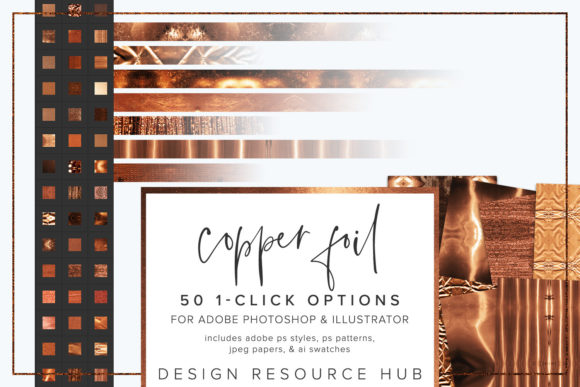
In the fast-paced world of digital design, texture is often the differentiator between a flat, forgettable graphic and a piece that commands attention. Copper Foil Photoshop Styles offer a sophisticated solution for designers who need to add metallic depth and luxury to their work without spending hours manually painting highlights and shadows. This set of Adobe Photoshop styles provides one-click options for use with Adobe Photoshop and Adobe Illustrator, bridging the gap between complex texturing techniques and efficient workflow management.
For professionals ranging from marketing managers to freelance illustrators, the ability to apply a specific style to fonts, fill shapes, or add accents to images instantly can significantly reduce production time. The visual appeal of copper—warm, reflective, and modern—makes it a popular choice for branding, packaging, and editorial layouts. By integrating these tools into your creative toolkit, you gain access to a consistent aesthetic that elevates the perceived value of your projects.
Streamlining the Creative Workflow
One of the primary advantages of using pre-built styles is efficiency. Manually creating a realistic foil effect involves multiple layers, blending modes, gradient maps, and careful masking. It is a tedious process that can take thirty minutes or more per element. With Copper Foil Photoshop Styles, this process is reduced to a single click. This speed is particularly beneficial for entrepreneurs and small business owners who may not have dedicated design teams but still require high-quality visuals for social media posts, flyers, or product mockups.
The versatility of these styles allows them to be applied to various design elements. Whether you are working on a logo, a wedding invitation, or a website header, the seamless nature of the patterns ensures that the texture looks natural at any scale. You can change the scale of the patterning for different applications, ensuring that the grain of the copper matches the resolution and intent of your final output. This flexibility means you are not locked into a single look; instead, you can adapt the texture to suit both subtle background accents and bold, headline-grabbing typography.
Cross-Application Compatibility
Modern design workflows rarely exist in a single application. Designers often move between raster-based editing in Photoshop and vector-based illustration in Illustrator. Recognizing this, the package includes files tailored for both environments. The inclusion of an Adobe Illustrator .ai swatch file means that vector artists can maintain crisp edges while applying the copper texture, which is essential for large-format printing or scalable logos.
To install the .ai file, users simply navigate to Swatches, open the Swatch Library, select Other Library, and load the .ai file. This seamless integration ensures that the color and texture consistency is maintained across different stages of the design process. For those working primarily in Photoshop, the .asl file installs via the Styles panel, while the .pat file loads into the Patterns panel. This comprehensive approach supports a holistic design strategy, allowing creators to switch between tools without losing the visual thread of their project.
Practical Applications for Diverse Creators
The utility of Copper Foil Photoshop Styles extends beyond simple decoration. For marketers, metallic textures can convey premium quality and exclusivity. Applying these styles to product packaging mockups can help clients visualize how a brand might look on a physical shelf, aiding in decision-making and approval processes. Educators and publishers can use these textures to create engaging headers for textbooks or online courses, breaking up monotony and drawing the eye to key information.
Hobbyists and bloggers also benefit from these tools. A lifestyle blogger might use the copper accent to highlight quote graphics on Instagram, creating a cohesive and stylish feed that attracts followers. The included JPEG paper files, sized at 10 x 10 inches, provide additional resources for digital scrapbooking or collage work, adding a tactile feel to digital compositions. These assets allow non-designers to achieve professional-looking results with minimal technical knowledge.
Enhancing Visual Communication
Texture plays a crucial role in visual communication. It adds depth and realism, making digital designs feel more tangible. Copper, in particular, carries connotations of warmth, stability, and elegance. When used effectively, it can soften the coldness of digital screens and create a more inviting user experience. By combining these styles with brushes, designers can create custom effects that go beyond standard presets, adding unique flourishes that distinguish their work from competitors.
However, it is important to use these tools judiciously. Overuse of metallic textures can lead to visual clutter, distracting from the core message. The best practice is to use copper foil as an accent rather than a dominant feature. Apply it to borders, key words, or icons to guide the viewer’s eye. Testing different scales and opacities can help find the right balance for each specific project. Remember that the goal is to enhance readability and aesthetic appeal, not to overwhelm the viewer.
Installation and Technical Considerations
Getting started with Copper Foil Photoshop Styles is straightforward, but understanding the installation process ensures a smooth experience. The single-click styles are completely seamless, meaning they tile perfectly without visible edges. This is crucial for filling large shapes or backgrounds where pattern repetition would otherwise be noticeable. To install the .asl file, go to the Styles panel, click the menu icon, select Import Styles, and load the file. Similarly, for patterns, use the Patterns panel to import the .pat file.
Users should note that while these styles are designed for ease of use, the final appearance can depend on the underlying colors and lighting of the design. Experimenting with different base colors can yield varied results, from bright, polished copper to darker, aged bronze tones. This adaptability allows for creative exploration and customization. Additionally, ensuring that your software is up to date will prevent compatibility issues, particularly when working with newer features in Adobe Creative Cloud applications.
Making the Right Choice for Your Projects
When deciding whether to incorporate Copper Foil Photoshop Styles into your workflow, consider the specific needs of your current and future projects. If you frequently create materials that require a touch of luxury or metallic finish, this toolset offers significant value. It saves time, ensures consistency, and provides a professional finish that might otherwise require advanced skills. For those new to design, it serves as an educational tool, demonstrating how light and texture interact on digital surfaces.
Ultimately, these styles are about empowering creators to focus on their ideas rather than getting bogged down in technical execution. By handling the complex aspects of texture creation, they free up mental space for strategic thinking and creative problem-solving. Whether you are a seasoned professional looking to streamline your process or a beginner eager to elevate your designs, these tools provide a reliable and versatile foundation for achieving high-quality results.