Procreate Spring Sentiments - FREE: A Practical Guide to Seasonal Digital Lettering
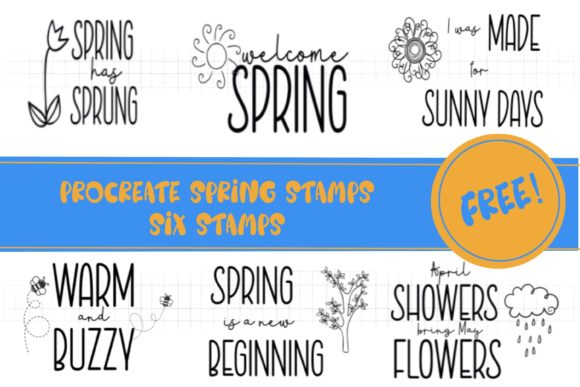
There is a distinct shift in creative energy when winter finally releases its grip. For digital artists, illustrators, and designers, this seasonal transition often demands a refresh in visual assets and mood. Procreate Spring Sentiments - FREE offers a streamlined way to inject that fresh, optimistic energy into your workflow without starting from scratch. This collection provides six distinct stamp brushes designed specifically for the Procreate ecosystem, allowing creators to quickly add typographic elements that celebrate the arrival of spring.
While these assets are simple in structure, their utility lies in how they integrate into broader design processes. Whether you are creating social media graphics, designing greeting cards, or adding finishing touches to digital illustrations, understanding how to manipulate and customize these stamps can significantly enhance your efficiency. This guide explores how to effectively incorporate these free resources into your creative pipeline, ensuring they serve as functional tools rather than just decorative afterthoughts.
Understanding the Asset and Its Workflow Fit
Before diving into execution, it is essential to understand what this asset is and, perhaps more importantly, what it is not. These are stamp brushes, meaning they function as single-stroke images rather than editable text layers. This distinction is crucial for planning your project structure. Because they are raster-based stamps, they work exclusively within Procreate. They are not compatible with vector-based software like Adobe Illustrator unless exported as high-resolution images, which limits scalability.
In a professional workflow, these stamps fit best during the embellishment phase of a project. They are ideal for scenarios where you need consistent, hand-lettered aesthetics but lack the time to draw custom typography from scratch. By using pre-made sentiments, you maintain visual consistency across a series of posts or products while reducing the manual labor associated with lettering. This makes them particularly valuable for small business owners, content creators, and educators who need to produce high volumes of visually appealing material under tight deadlines.
Customization Techniques for Unique Results
The default appearance of these stamps is monochrome, typically black or white depending on your brush settings. However, relying solely on the default color limits their versatility. To truly integrate these assets into a cohesive design, you must master the technique of non-destructive coloring. This process allows you to experiment with palettes without altering the original stamp layer, preserving the ability to make changes later.
To achieve this, follow a structured approach:
- Layer Management: Always place your stamp on its own dedicated layer. This isolation is critical for maintaining a clean file structure.
- Clipping Masks: Create a new layer directly above your stamp layer. Tap the layer thumbnail and select "Clipping Mask." This ensures that any paint you apply will only appear where the stamp exists, preventing messy edges.
- Color Application: Choose your preferred brush or pen tool on the clipped layer. You can use solid colors for a bold look or textured brushes to add depth and dimension to the letters.
- Blending Modes: Experiment with blending modes such as Multiply, Overlay, or Color Dodge on the clipped layer to create complex interactions between the sentiment and the background artwork.
This method transforms a static black-and-white stamp into a dynamic design element that matches your specific brand colors or artistic style. It is a simple yet powerful technique that elevates the perceived quality of the final output.
Integration with Other Design Elements
Digital design rarely relies on a single element. The effectiveness of Procreate Spring Sentiments - FREE depends on how well it interacts with other components of your composition. When incorporating these stamps, consider the hierarchy of information. The sentiment should complement, not compete with, your primary visual subject.
For example, if you are illustrating a floral arrangement, place the stamp in an area of negative space to balance the composition. Use the opacity slider to soften the stamp if it feels too dominant against a busy background. Additionally, consider combining these stamps with other brush sets available in the creator’s shop. Layering different textures and styles can create a rich, mixed-media effect that feels organic and handcrafted.
Consistency is key when using these assets across multiple projects. Establish a standard set of colors and placement rules for your brand or personal style. This preparation ensures that whether you are creating a Instagram story in March or a newsletter header in April, your visual identity remains recognizable and professional.
Practical Use Cases for Creators and Professionals
The versatility of these spring-themed stamps extends beyond simple decoration. Here are several practical applications where they can enhance your workflow:
- Social Media Content: Quickly create engaging stories or posts celebrating seasonal holidays like Easter or Mother’s Day. The pre-written sentiments save time on copywriting while adding a personal touch.
- Digital Planners and Journals: Enhance digital planning layouts with motivational quotes or seasonal headers. The lightweight nature of the brushes ensures they do not slow down your device.
- Greeting Card Design: Use the stamps as the focal point for handmade digital cards. Combine them with watercolor brushes to simulate traditional media.
- Educational Materials: Teachers and educators can use these sentiments to decorate worksheets or presentation slides, making learning materials more inviting and seasonally relevant.
Each of these use cases benefits from the speed and ease of use provided by stamp brushes. By reducing the time spent on lettering, you can allocate more resources to concept development and overall composition quality.
Quality Control and Long-Term Utility
While this set is a free sample, treating it with the same rigor as paid assets ensures better outcomes. Regularly update your Procreate app to ensure compatibility with the latest brush engines. Organize your brush library by creating a dedicated group for seasonal assets. This organization prevents clutter and allows for quick retrieval when inspiration strikes.
It is also important to recognize the limitations of free samples. This set includes only six sentiments, which may not cover every textual need. View this package as an entry point into the creator’s broader ecosystem. If you find value in the quality and usability of these free stamps, exploring the full spring sentiments brush set may offer the comprehensive variety needed for larger commercial projects.
Furthermore, always check the licensing terms associated with free downloads. While most creators allow personal and commercial use for their freebies, verifying this protects your business from potential legal issues. Clear understanding of usage rights is a fundamental aspect of professional digital asset management.
Maximizing Value Through Community Engagement
Digital art tools evolve rapidly, and staying connected with creators ensures you remain informed about updates, new releases, and advanced techniques. Following the creator of Procreate Spring Sentiments - FREE provides access to notifications about future freebies and premium offerings. This connection can be invaluable for discovering complementary tools that enhance your current workflow.
Engaging with the creator’s community also offers opportunities for learning. Observing how other artists utilize these stamps can inspire new techniques and applications. Share your own creations using the hashtags recommended by the creator to build visibility and connect with peers who share similar interests.
In conclusion, Procreate Spring Sentiments - FREE is more than just a collection of digital stamps; it is a tool for efficient, expressive communication. By mastering the technical aspects of clipping masks and layer management, and by strategically integrating these assets into your broader design process, you can elevate your spring-themed projects with minimal effort. Embrace the end of winter by adopting tools that streamline your creativity, allowing you to focus on what matters most: bringing your unique vision to life.